
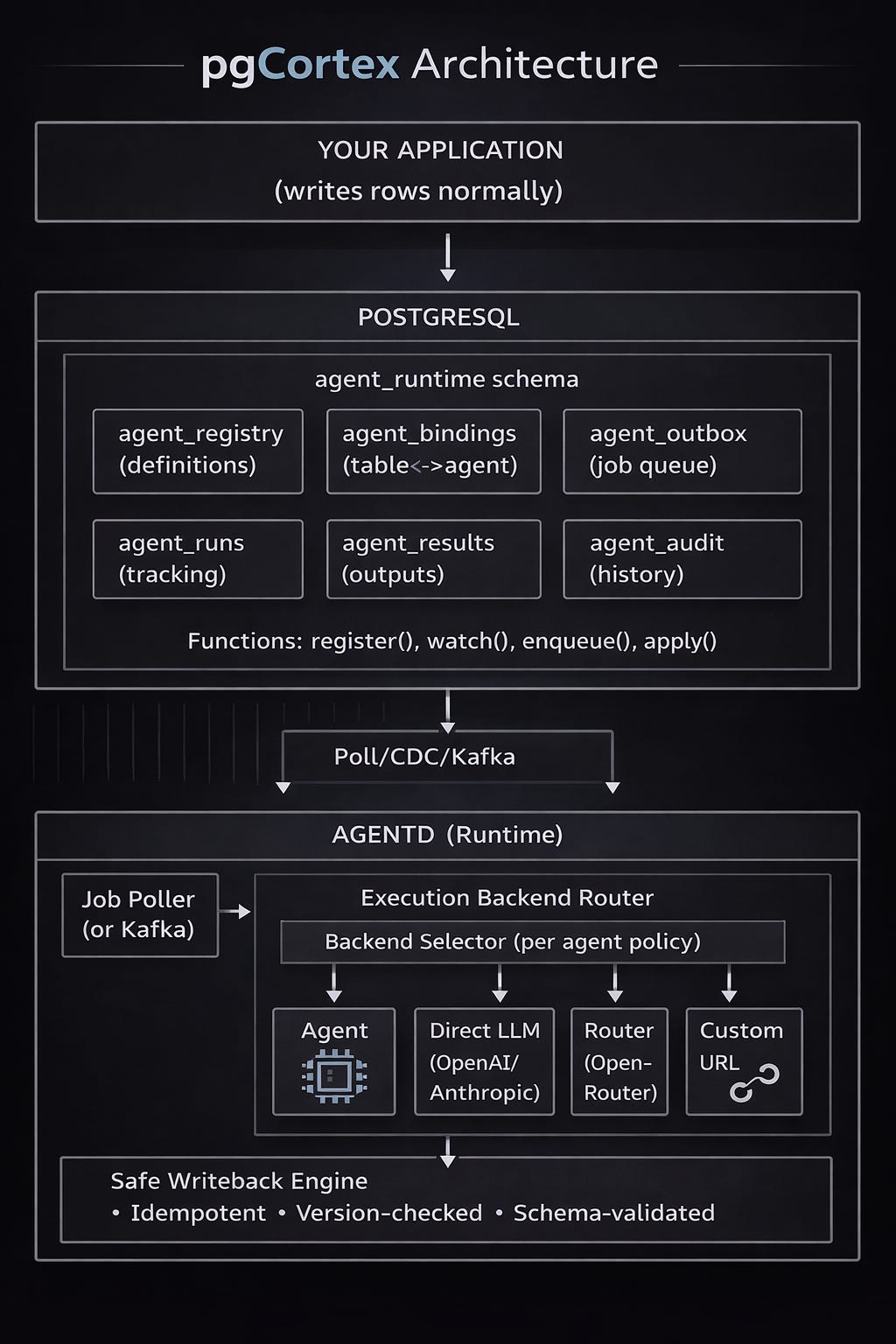
PostgreSQL: The Backbone of Modern Applications
PostgreSQL isn’t just a database. It’s the foundation upon which countless businesses run. From startups to Fortune 500 companies, Postgres powers everything: financial transactions, healthcare records, e-commerce platforms, and SaaS applications serving millions of users.
Why? Because PostgreSQL delivers what enterprises demand:
ACID guarantees that ensure data integrity
Battle-tested reliability across decades of production use
Extensibility that adapts to evolving needs
Rich ecosystem of tools, extensions, and expertise
When your data lives in PostgreSQL, you have transactional safety, referential integrity, and a query language that has stood the test of time.
But here’s the thing: the world has changed.
The Missing Piece: AI-Native Data Enrichment
Every modern application now needs AI. Not as a bolt-on feature, but as a core capability woven into the data layer:
Support tickets need automatic priority classification
User content needs real-time moderation
Sales leads need instant qualification scoring
Invoices need automated data extraction
Transactions need fraud risk assessment
The pattern is clear: data arrives, AI enriches it, business logic acts on it.
But how do you integrate this? The naive approaches all have serious problems.
Approach 1: Application-Layer Integration
User Request → App Server → Database
                    ↓
              LLM API Call
                    ↓
              Update Database
Problems:
Tight coupling between business logic and AI enrichment
Race conditions when multiple services write to the same row
Inconsistent processing as different services implement their own logic
No guarantee of completion if the app crashes after insert but before AI call
Approach 2: Batch Jobs
Run periodic jobs that scan for unprocessed rows and enrich them.
Problems:
Latency: Minutes or hours before enrichment completes
Complexity: Managing job state, retries, and failures
Resource waste: Polling for changes instead of reacting to them
Scale challenges: What happens when you have millions of rows?
Approach 3: In-Database AI (The Dangerous Path)
What if we just called LLMs directly from PostgreSQL triggers or functions?
-- DON'T DO THIS
CREATE FUNCTION enrich_on_insert() RETURNS TRIGGER AS $$
BEGIN
    -- HTTP call to LLM inside a transaction
    NEW.category := http_post('https://api.openai.com/...', ...);
    RETURN NEW;
END;
$$ LANGUAGE plpgsql;
This seems elegant. It’s also a disaster waiting to happen.
Why In-Database AI Breaks Everything
Running LLM calls inside database transactions violates fundamental principles of database design. Here’s what goes wrong:
1. Transaction Blocking
PostgreSQL connections are precious. When you make an HTTP call inside a trigger:
The transaction holds locks while waiting for the LLM response
Other transactions queue up waiting for those locks
LLM latency (500ms-5s) becomes database latency
Your 1000-connection pool becomes 1000 blocked connections
One slow LLM response can cascade into a complete database freeze.
2. Atomicity Violations
What happens when:
The LLM call succeeds but the transaction rolls back?
The LLM call fails but you’ve already charged the customer?
The LLM call times out after 30 seconds?
You’ve now violated ACID properties. Your database no longer guarantees consistency.
3. Retry Complexity
LLM APIs have:
Rate limits
Transient failures
Timeout variations
Cost implications
Implementing proper retry logic with exponential backoff inside a database trigger is possible but painful. And every retry extends the transaction duration.
4. Resource Exhaustion
Each database worker running an LLM call:
Consumes a connection slot
Holds memory for the HTTP client
Blocks the worker from serving other queries
Under load, you’ll exhaust workers on LLM calls while actual queries starve.
5. No Observability
How do you:
Track LLM costs per table or operation?
Monitor success rates and latencies?
Debug why a specific enrichment failed?
Audit who triggered what AI operation?
Database triggers provide none of this visibility.
6. Testing Nightmares
Every INSERT in your test suite now calls a real (or mocked) LLM. Your test suite becomes:
Slow (waiting for LLM responses)
Expensive (API costs)
Flaky (network-dependent)
Enter pgCortex: The DB-Adjacent Architecture
pgCortex solves this with a simple but powerful insight: separate the concerns.
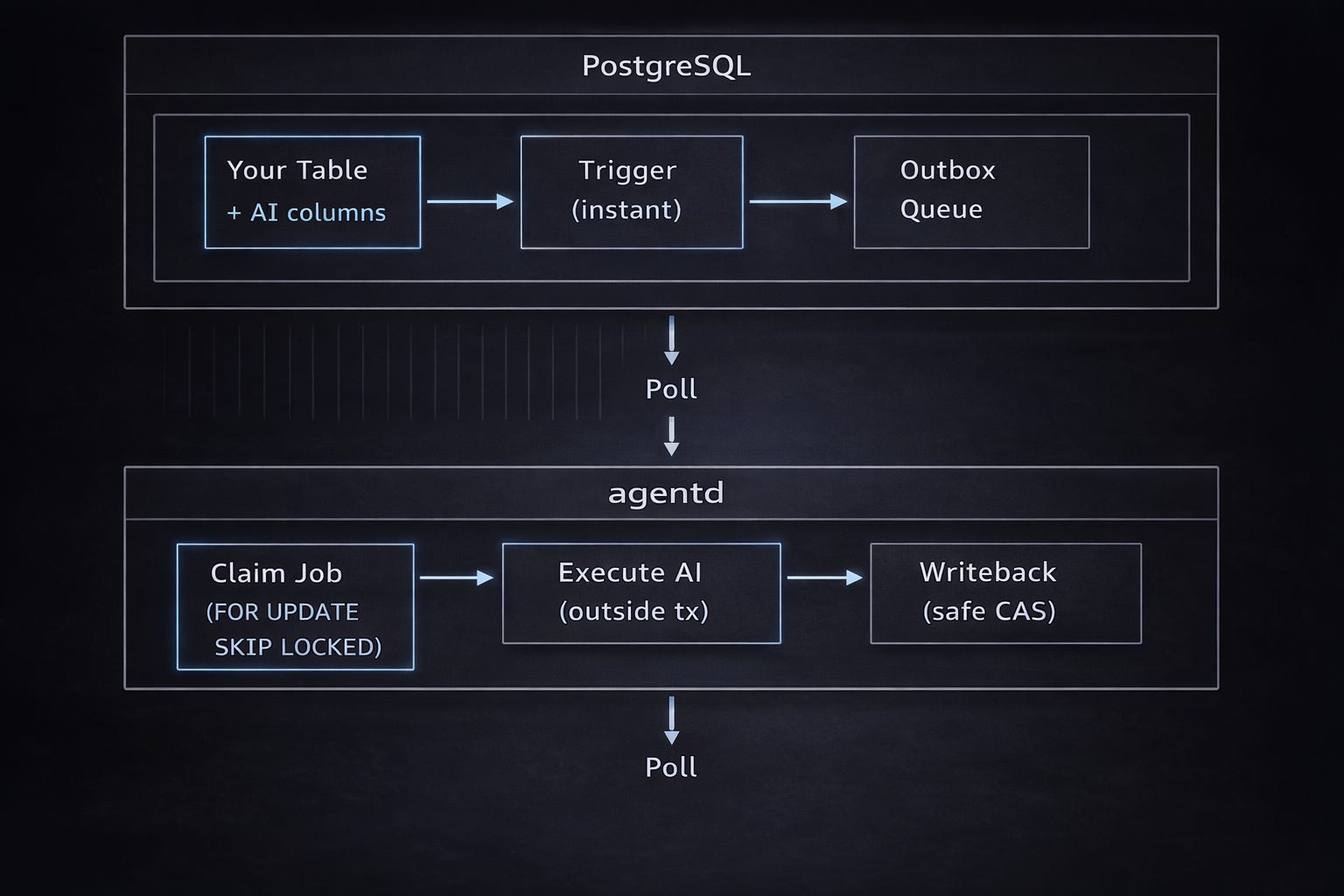
The architecture:
Triggers are instant: When data arrives, a lightweight trigger enqueues a job to the outbox table. No HTTP calls, no blocking. The transaction completes immediately.
Processing is external: A separate worker (
agentd) polls the outbox, claims jobs, and executes AI operations. This happens outside any database transaction.Writeback is safe: Results are written back using idempotent, version-checked operations. Even if the worker crashes mid-process, the system recovers gracefully.
How pgcortex Works
Step 1: Register Your Agent
Define what AI should do when it sees your data:
SELECT agent_runtime.agent_register(
    p_name    => 'ticket_classifier',
    p_version => 'v1',
    p_prompt  => 'Classify this support ticket. Return JSON with:
                  - priority: critical/high/medium/low
                  - category: bug/feature/question/billing
                  - summary: one-line summary',
    p_output_schema => '{
        "type": "object",
        "properties": {
            "priority": {"type": "string"},
            "category": {"type": "string"},
            "summary": {"type": "string"}
        }
    }'::jsonb,
    p_policy => '{
        "backend": "router",
        "provider": "openrouter",
        "model": "openai/gpt-4o-mini"
    }'::jsonb
);
Step 2: Bind to Your Table
Tell pgcortex which tables to watch and where to write results:
SELECT agent_runtime.agent_watch(
    p_table_name => 'public.support_tickets',
    p_pk_column  => 'id',
    p_agent_name => 'ticket_classifier',
    p_agent_ver  => 'v1',
    p_writeback  => '{
        "priority": "$.priority",
        "category": "$.category",
        "ai_summary": "$.summary"
    }'::jsonb,
    p_on_events => '["INSERT"]'::jsonb
);
Step 3: Just Use Your Database
INSERT INTO support_tickets (subject, body)
VALUES ('URGENT: Production down', 'Our API is returning 500 errors...');
That’s it. The ticket is inserted instantly. Milliseconds later, the AI enrichment happens automatically. The priority, category, and ai_summary columns populate without any application code changes.
Flexible Backend Architecture
pgcortex doesn’t lock you into one AI provider. The backend system supports:
Direct LLM Calls
{
    "backend": "llm",
    "provider": "openai",
    "model": "gpt-4o",
    "api_key_env": "OPENAI_API_KEY"
}
OpenRouter (Access 100+ Models)
{
    "backend": "router",
    "provider": "openrouter",
    "model": "anthropic/claude-3-sonnet"
}
Any OpenAI SDK-Compatible Platform
{
    "backend": "agent",
    "base_url": "https://your-agent-platform.com/v1",
    "api_key_env": "PLATFORM_API_KEY"
}
This works with any platform exposing the OpenAI SDK interface: custom deployments, fine-tuned models, enterprise AI platforms, or self-hosted solutions.
Enterprise-Ready by Design
pgcortex isn’t a prototype. It’s built for production environments where security, compliance, and observability are non-negotiable.
Security Model
Least-Privilege Access
The agentd worker never sees your database credentials beyond what’s needed:
-- Read-only role for job claiming
CREATE ROLE agent_reader;
GRANT SELECT ON agent_runtime.agent_outbox TO agent_reader;

-- Limited write role for safe writeback
CREATE ROLE agent_writer;
-- Only UPDATE specific columns via controlled functions
GRANT EXECUTE ON FUNCTION agent_runtime.agent_apply TO agent_writer;
No Direct Table Access
The worker can only:
Read from the outbox queue
Write to columns explicitly declared in the binding
Cannot read your actual data beyond what’s in the job payload
API Keys Stay in Environment
{"api_key_env": "OPENROUTER_API_KEY"}
Keys are never stored in the database. They’re read from environment variables at runtime.
Row-Level Security Compatible
pgcortex works alongside PostgreSQL’s RLS policies. The worker operates through your existing security model.
Observability
Structured Audit Trail
Every operation is logged:
SELECT * FROM agent_runtime.agent_audit;

Execution Metrics
Track performance and costs:
SELECT
    agent_name,
    COUNT(*) as total_runs,
    AVG(EXTRACT(EPOCH FROM (completed_at - started_at))) as avg_duration_sec,
    SUM(tokens_input + tokens_output) as total_tokens,
    SUM(CASE WHEN status = 'failed' THEN 1 ELSE 0 END) as failures
FROM agent_runtime.agent_runs
WHERE started_at > NOW() - INTERVAL '24 hours'
GROUP BY agent_name;
Queue Health Monitoring
-- Jobs waiting to be processed
SELECT status, COUNT(*)
FROM agent_runtime.agent_outbox
GROUP BY status;

-- Stuck jobs (claimed but not completed)
SELECT * FROM agent_runtime.agent_outbox
WHERE status = 'claimed'
AND claimed_at < NOW() - INTERVAL '5 minutes';
Compliance
Immutable Audit Log
The agent_audit table provides a complete history of all AI operations. You can answer:
What AI processed this customer’s data?
When was this record enriched?
What model and prompt were used?
Schema Validation
Every agent output is validated against a JSON Schema before writeback:
p_output_schema => '{
    "type": "object",
    "properties": {
        "priority": {"enum": ["critical", "high", "medium", "low"]}
    },
    "required": ["priority"]
}'::jsonb
Invalid outputs are rejected, ensuring data quality.
Version Control
Agents are versioned. When you update a prompt or schema, create a new version:
SELECT agent_runtime.agent_register(
    p_name    => 'ticket_classifier',
    p_version => 'v2',  -- New version
    ...
);
Previous runs retain their version reference. You always know which version processed which data.
Resilience Patterns
Exactly-Once Processing
SELECT * FROM agent_runtime.agent_outbox
WHERE status = 'pending'
FOR UPDATE SKIP LOCKED  -- Distributed-safe claiming
LIMIT 10;
Multiple workers can run simultaneously. FOR UPDATE SKIP LOCKED ensures each job is claimed by exactly one worker.
Automatic Retries with Backoff
Failed jobs are retried with exponential backoff:
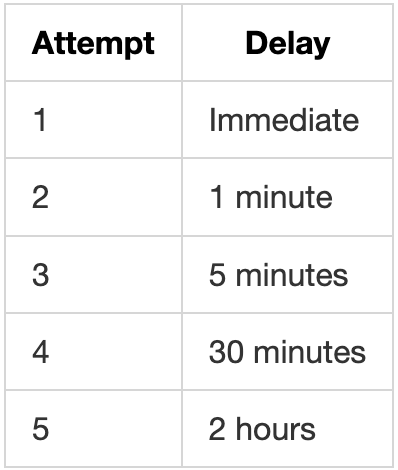
After max retries, jobs move to dead status for manual review.
Crash Recovery
If a worker crashes mid-processing:
The job remains in
claimedstatusA supervisor process detects the timeout
The job is reset to
pendingfor reprocessingIdempotent writeback ensures no duplicate effects
Ideal Use Cases
pgcortex shines when you need automatic, reliable AI enrichment of database records.
Customer Support
Ticket triage: Auto-classify priority and route to teams
Response drafting: Generate suggested replies
Sentiment detection: Flag angry customers for escalation
Content Platforms
Moderation: Auto-approve or flag user content
Categorization: Tag and organize uploaded content
Summarization: Generate previews and excerpts
E-commerce
Product tagging: Auto-categorize new listings
Review analysis: Extract sentiment and key topics
Search optimization: Generate keywords and descriptions
Sales & Marketing
Lead scoring: Qualify inbound leads automatically
Company enrichment: Expand firmographic data
Email classification: Route inquiries to departments
Finance & Risk
Fraud detection: Score transactions in real-time
Document extraction: Parse invoices and contracts
Compliance tagging: Identify regulated content
HR & Recruiting
Resume parsing: Extract skills and experience
Job matching: Score candidate-job fit
Feedback analysis: Process employee surveys
Real Example: Support Ticket Classification
Let’s walk through a complete example.
The Table
CREATE TABLE support_tickets (
    id UUID PRIMARY KEY DEFAULT gen_random_uuid(),
    customer_email VARCHAR(255),
    subject VARCHAR(500),
    body TEXT,

    -- AI-enriched columns
    priority VARCHAR(20),
    category VARCHAR(50),
    ai_summary TEXT,

    created_at TIMESTAMPTZ DEFAULT now()
);
The Agent
SELECT agent_runtime.agent_register(
    p_name    => 'ticket_classifier',
    p_version => 'v1',
    p_prompt  => $prompt$
You are a support ticket classifier. Analyze the ticket and determine:

1. Priority:
   - critical: System down, security issue, data loss
   - high: Major feature broken, blocking customer
   - medium: Bug or issue with workaround
   - low: Question, minor issue, feature request

2. Category:
   - bug: Something is broken
   - feature: Enhancement request
   - question: How-to or clarification
   - billing: Payment or subscription
   - security: Security concern

3. Summary: One sentence describing the core issue.

Return JSON with priority, category, and summary fields.
$prompt$,
    p_output_schema => '{
        "type": "object",
        "properties": {
            "priority": {"type": "string", "enum": ["critical", "high", "medium", "low"]},
            "category": {"type": "string", "enum": ["bug", "feature", "question", "billing", "security"]},
            "summary": {"type": "string", "maxLength": 200}
        },
        "required": ["priority", "category", "summary"]
    }'::jsonb,
    p_policy => '{
        "backend": "router",
        "provider": "openrouter",
        "model": "openai/gpt-4o-mini",
        "api_key_env": "OPENROUTER_API_KEY",
        "max_tokens": 150
    }'::jsonb
);
The Binding
SELECT agent_runtime.agent_watch(
    p_table_name => 'public.support_tickets',
    p_pk_column  => 'id',
    p_agent_name => 'ticket_classifier',
    p_agent_ver  => 'v1',
    p_writeback  => '{
        "priority": "$.priority",
        "category": "$.category",
        "ai_summary": "$.summary"
    }'::jsonb,
    p_on_events  => '["INSERT"]'::jsonb
);
The Magic
-- Insert a ticket
INSERT INTO support_tickets (customer_email, subject, body) VALUES
('customer@company.com',
 'URGENT: Cannot process payments',
 'Since this morning, all payment attempts fail with error code 500.
  We have processed $0 in the last 4 hours. This is critical for our business.');

-- Wait a moment, then check
SELECT subject, priority, category, ai_summary FROM support_tickets;
Result:

The ticket was classified automatically. Your support team sees prioritized, categorized tickets the moment they arrive.
Getting Started
Docker Compose (Quickest)
version: '3.8'
services:
  postgres:
    image: postgres:16
    environment:
      POSTGRES_PASSWORD: postgres
    volumes:
      - ./sql/agent_runtime.sql:/docker-entrypoint-initdb.d/01-schema.sql

  agentd:
    build: .
    environment:
      DATABASE_URL: postgresql://postgres:postgres@postgres:5432/postgres
      OPENROUTER_API_KEY: ${OPENROUTER_API_KEY}
    depends_on:
      - postgres
docker compose up -d
Existing PostgreSQL
Run the schema migration:
psql -f sql/agent_runtime.sql
Start the worker:
pip install pgcortex-agentd
agentd --database-url postgresql://...
The Philosophy
pgcortex follows a simple principle: let databases be databases, let AI be AI.
Your database should:
Store data reliably
Enforce constraints
Process transactions quickly
Maintain consistency
Your AI layer should:
Handle variable latency
Manage retries and failures
Scale independently
Evolve without schema changes
By keeping these concerns separate but connected, you get the best of both worlds: the reliability of PostgreSQL with the intelligence of modern AI.
What’s Next
pgcortex is actively developed. Coming soon:
Streaming support for long-form generation
Conditional triggers (only process when conditions match)
Multi-agent workflows (chain agents together)
Built-in embeddings for vector search integration
Dashboard UI for monitoring and management
Conclusion
AI enrichment of database records shouldn’t require architectural gymnastics. With pgcortex, you:
Define what AI should do (agent registration)
Connect AI to your tables (binding)
Use your database normally (INSERT/UPDATE)
Trust that enrichment happens reliably
No application code changes. No transaction blocking. No reliability concerns.
Just PostgreSQL, enhanced with AI superpowers.
pgcortex is open source. Star us on GitHub and join the community building the future of AI-native databases.
Author
Supreeth Ravi | Principal Author & Research Lead
I’m building infrastructure for AI-native databases at Phronetic. If you’re working on similar problems or want to discuss enterprise AI architecture, let’s connect.
Email: supreeth.ravi@phronetic.ai
Website: supreethravi.com
LinkedIn: linkedin.com/in/supreeth-ravi
Links: